Usage Conditions to Check When Distinguishing Publicly Redistributable Materials From Copyright-Infringing Files
Usage Conditions & Criteria to Distinguish Publicly Redistributable Materials vs. Copyright-Infringing Files
The boundary between a publicly redistributable file and a copyright-infringing file is extremely thin. Re-sharing digital content such as images, audio, documents, or software without carefully verifying legal conditions can lead to content removal, account suspension, or financial liability. To accurately determine the legal status of a file before publishing, you must directly cross-reference the following 5 technical criteria and usage conditions:
Standardized License Statement vs. Vague Phrases
The single most critical legal indicator of a publicly redistributable file is the presence of a traceable, standardized license.
- Legally Void Phrases: Phrases like “Free to use,” “No copyright intended,” or “Collected from the Internet” carry zero legal protection value. They do not grant you any rights to redistribute the file to others.
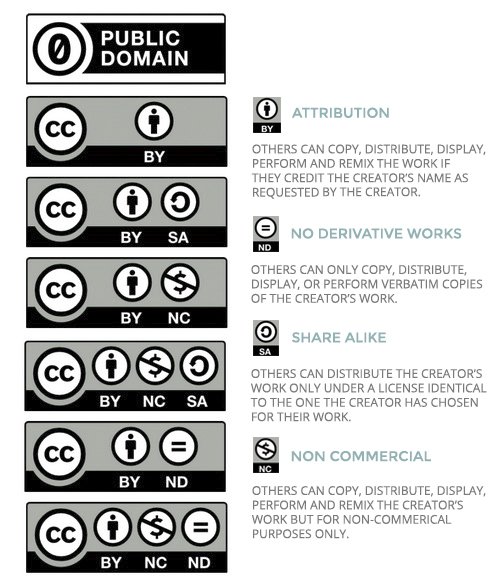
- Verifying Standardized Licenses: The file must include an active link pointing to recognized international licensing frameworks:
- Creative Commons (CC): Carefully inspect the specific license code. CC BY (Attribution) or CC BY-SA (ShareAlike) allow redistribution. Conversely, CC BY-NC (Non-Commercial) or CC BY-ND (NoDerivatives) strictly limit sharing rights depending on the intended use.
- Public Domain (CC0): The author has declared a waiver of copyright or the copyright protection term has expired, allowing completely unrestricted redistribution.
Inspecting Hidden Data (EXIF / ID3 Metadata) and Reverse Search Audits
Copyright-infringing files often have their original ownership metadata stripped or altered. Conducting technical inspection directly on the file reveals its true origin:
- Metadata Extraction: Download the file to your device and inspect its file properties. For images or videos, inspect EXIF data (camera model, author, copyright). For audio files, check ID3 tags. Genuine files typically preserve full copyright metadata from the original publisher.
- Reverse Search Audits: Use reverse image search engines such as Google Images, TinEye, or search for unique text strings. If search results reveal that the original file belongs to a paid stock photography platform or a subscription service, the file you hold is an unauthorized copy.
Comparing Commercial Originals vs. Trial Versions (Sample/Watermark Trap)
File quality and formatting serve as major technical indicators for detecting violations:
- Full Uncompressed Originals: If you possess a complete, uncompressed high-resolution file of a product currently sold commercially on an author’s official website without any trace of a trial license it is an infringing file.
- Sample or Watermarked Versions: Legitimate copyright holders sometimes release lower-resolution or watermarked versions for public sharing to serve promotional purposes. If the file you hold is completely watermark-free while the original version is sold at a high price, raise immediate legal suspicion.
Evaluating Distribution Platform Credibility
The download source plays a decisive role in legal safety during redistribution:
- Identity-Verified Platforms: Files downloaded directly from an author’s official website, verified channels, or reputable archives (Wikimedia Commons, Unsplash, or GitHub repositories with an explicit LICENSE file) carry high legal reliability.
- Unmoderated Free-Sharing Platforms: Large file-sharing forums, Torrent networks, or social media re-upload channels lacking clear source attribution are environments with near-total rates of copyright infringement.
Distinguishing Personal Use From Public Redistribution Rights
Many users mistakenly conflate these two scopes of permission:
- Free for Personal Use: Only permits you to download, view, listen to, or store the asset on a personal device. This permission does not allow you to upload the file to a personal website, post it in community groups, or republish it in any form.
- Public Redistribution Rights: Must explicitly state terms like “Redistribution Allowed” or “Share Alike.” If a file states “Personal Use Only,” sharing it publicly constitutes copyright infringement.
Standard Legal Verification Workflow Before Distributing Files
Before clicking the share button for any file on digital channels, execute the following 4-step verification workflow:
- Extract and Inspect Attached LICENSE Files: Search for
LICENSE.txt,README, or copyright descriptions attached to the file package. Confirm whether the license code permits “Public Redistribution.” - Execute Reverse Search Audits: Run images through TinEye or Google Images to check whether the file originates from a paid commercial package.
- Verify Uploader Identity: Check if the uploader is the original author or an authorized representative. If the uploader is an anonymous social media account, decline to redistribute.
- Archive Proof of License: Take a screenshot of the download page displaying the license declaration, and save the URL along with author details. This serves as your legal defense evidence if disputes arise later.
Debunking Dangerous Legal Myths About Digital Copyright
Percentage Myth (Is quoting 10% or 30 seconds safe?)
There is no international legal statute stating that quoting under 10% of a text or under 30 seconds of audio/video is automatically legal. The “Fair Use” doctrine evaluates based on the nature, purpose, and market impact on the original work, rather than relying on a fixed quantitative percentage figure.
“Automatic Copyright” and the Trap of “Available Online Means Free to Use”
Under the Berne Convention, a work is automatically protected by copyright from the moment it is fixed in a tangible medium (written on paper, saved as an MP3, or captured as a JPG). Authors are not required to register or affix a copyright symbol. The fact that a file appears publicly on the Internet does not mean it belongs to the public domain.
Public Domain and Risks Behind “No Copyright Intended”
A work only enters the Public Domain when the author actively waives rights via a CC0 license, or when statutory copyright protection terms expire (typically 50 to 70 years after the author’s death). Including the phrase “No Copyright Intended” in a description does absolutely nothing to shield you from legal liability when distributing an infringing file.
Financial Liability Risks and Response Workflow Upon Receiving a Takedown Notice
Unauthorized sharing of copyrighted files can result in statutory damages under US Copyright Law (DMCA) and equivalent international legal frameworks. For willful copyright infringement, damages can range from $750 to $150,000 per work, excluding attorney fees and legal costs. Upon receiving a Takedown Notice or copyright infringement warning, the distributor should promptly remove or temporarily hide the file across all public platforms to limit further exposure to liability. Concurrently, verify the validity of the notice by confirming whether the sender is the original copyright holder or an authorized agent, then cross-reference the licensing proof archived in Step 4 of the verification workflow. If you have sufficient legal grounds proving the file is permitted for public redistribution, you may submit a formal Counter-Notice to request content restoration. Conversely, if the file is confirmed to be infringing, proactively send an apology letter explaining the circumstances and replace the asset with a properly licensed document to minimize legal and financial fallout.
Frequently Asked Questions
Does using the phrase “Free for Personal Use” mean I can upload the file to a company website?
No. Company websites or personal platforms used for branding purposes are considered public and commercial distribution. “Free for Personal Use” only permits you as an individual to store and view/listen to the asset on your private device.
How can I verify if an online document’s copyright protection term has expired?
You need to look up the author’s year of birth and death. Typically, copyright expires 50 to 70 years after the author’s death (depending on national legislation). National libraries or public domain archives are reliable sources for verification.
Does a CC BY-NC license allow me to repost a file on a non-monetized personal blog?
Yes, provided your blog generates zero revenue of any kind (no ads, no product sales, no sponsorships). However, you remain strictly required to provide author attribution and link back to the original CC BY-NC license.